This is the PSU from a Symmetricom SyncServer NTP-server. The same capacitor has failed previously. The installed one was a 3300uF 10V cap and I replaced it with a 2200uF 16V one. Let's hope it works for a year or ten.
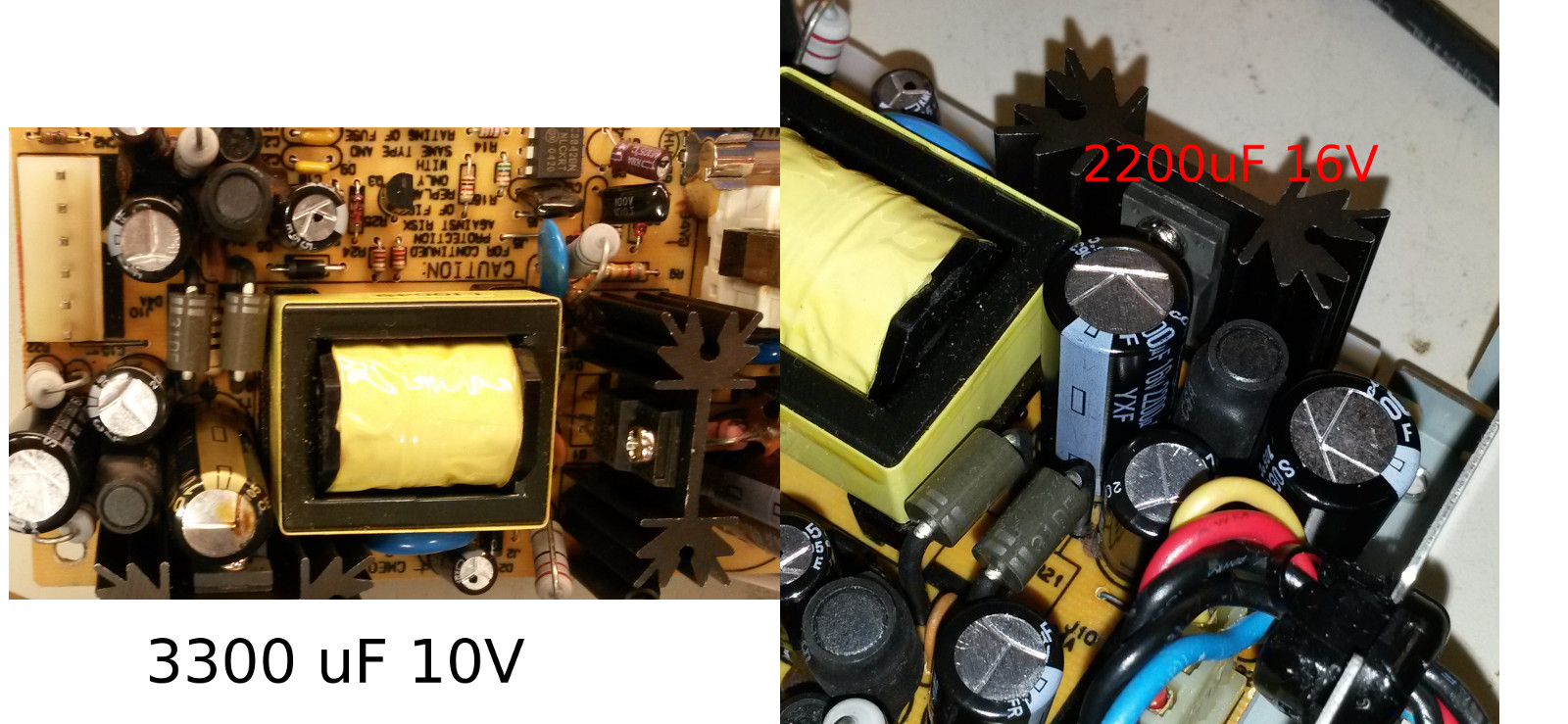
This is the PSU from a Symmetricom SyncServer NTP-server. The same capacitor has failed previously. The installed one was a 3300uF 10V cap and I replaced it with a 2200uF 16V one. Let's hope it works for a year or ten.
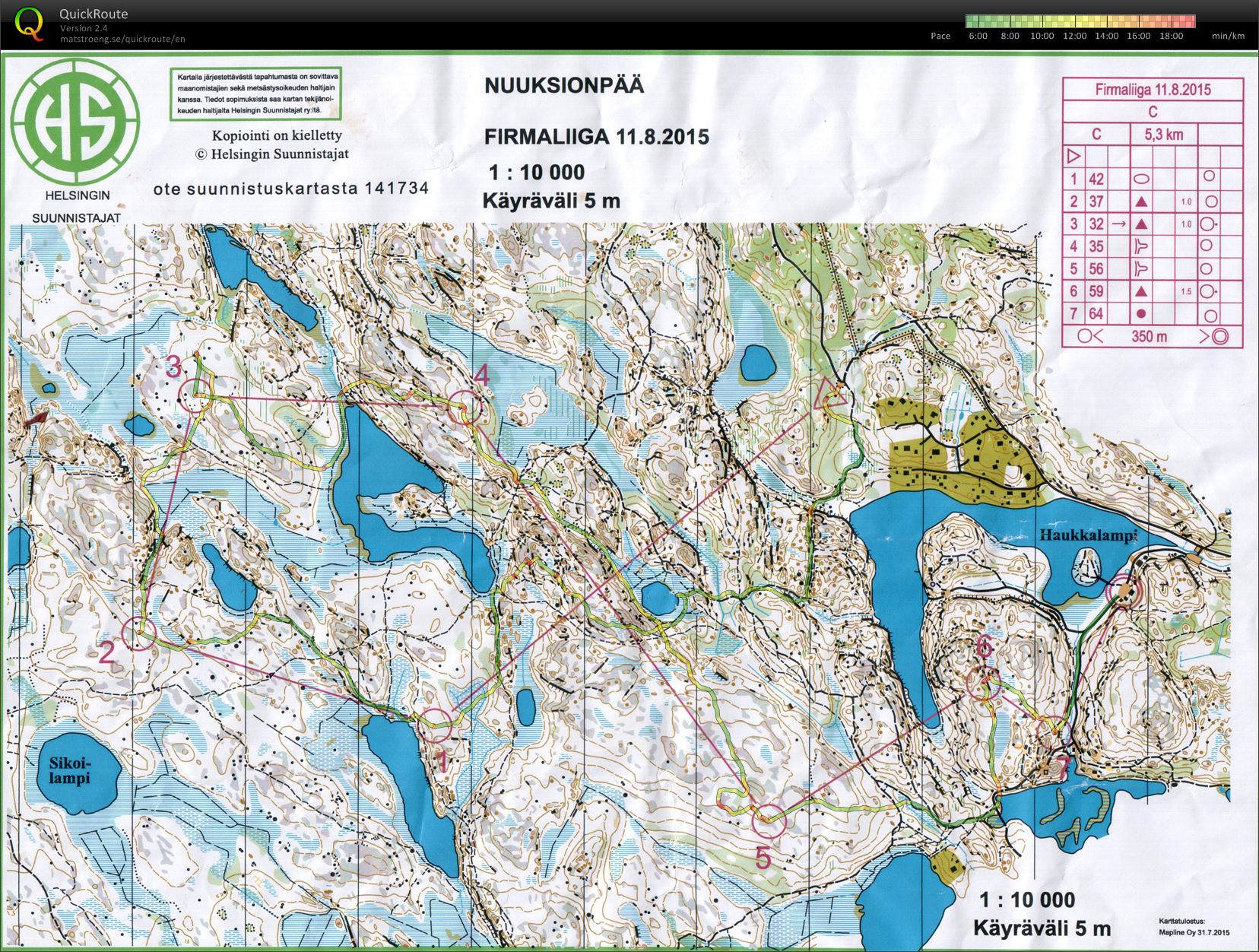
1: too much zigzag along paths with a big U-turn before the control
2: OK
3: ran past the control, then to the wrong stone (some other course had a control here), and then back to my control
4: OKish but straighter would have been better
5: OK until I was distracted by others just before the control and made a stupid loop before returning to the original plan.
6-7-F: nothing to report..
Hot and humid.
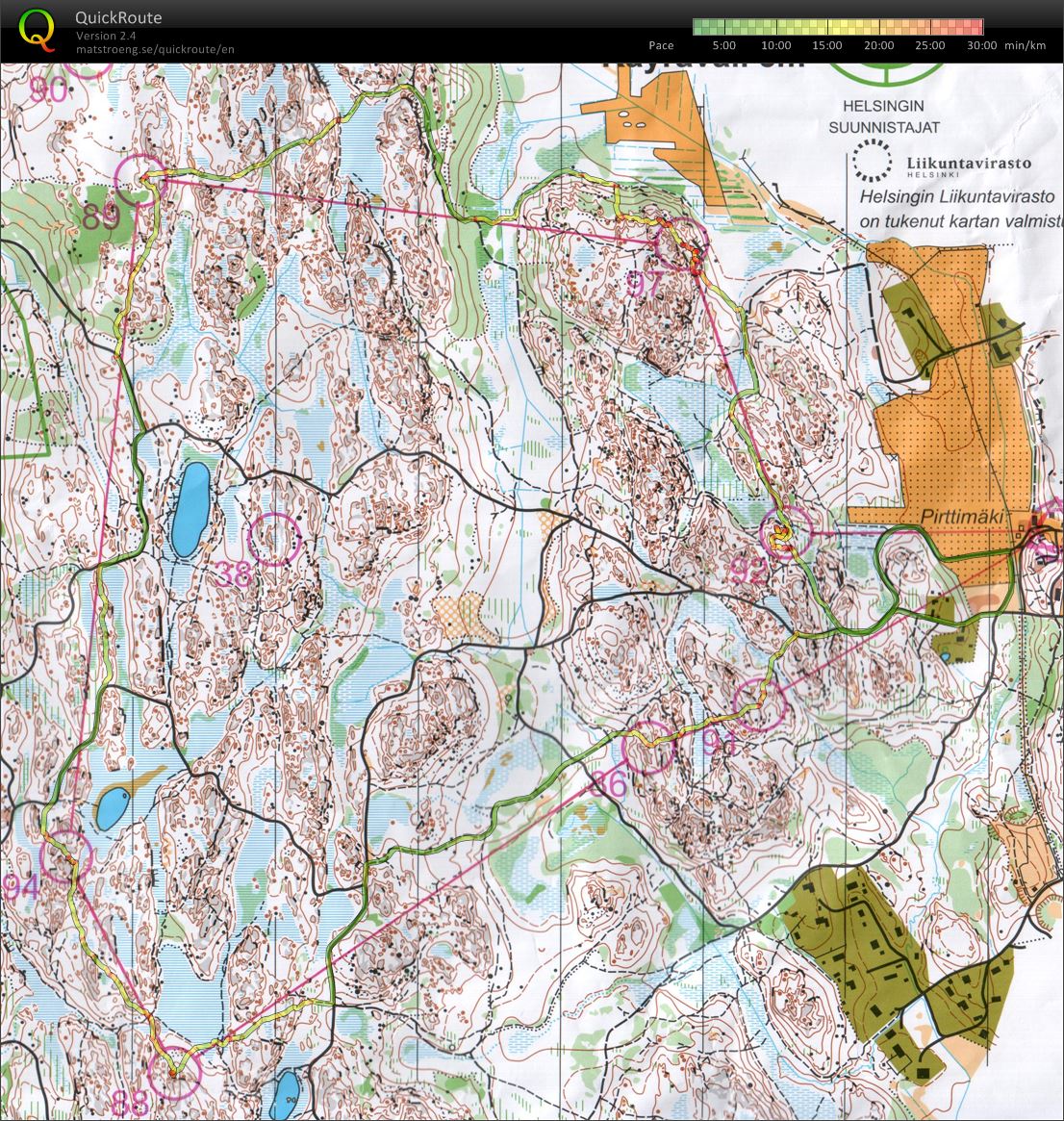
Quite warm and humid on Saturday.
OK in the beginning: start-91-86-88-84-89
The last two controls were difficult, 97 on a steep downslope where we climbed the hill a bit too soon, and struggled to get down from the hill after finding the control. 92 was easy enough to get close to, but in hindsight I suspect it's not actually located in the place indicated on the map...
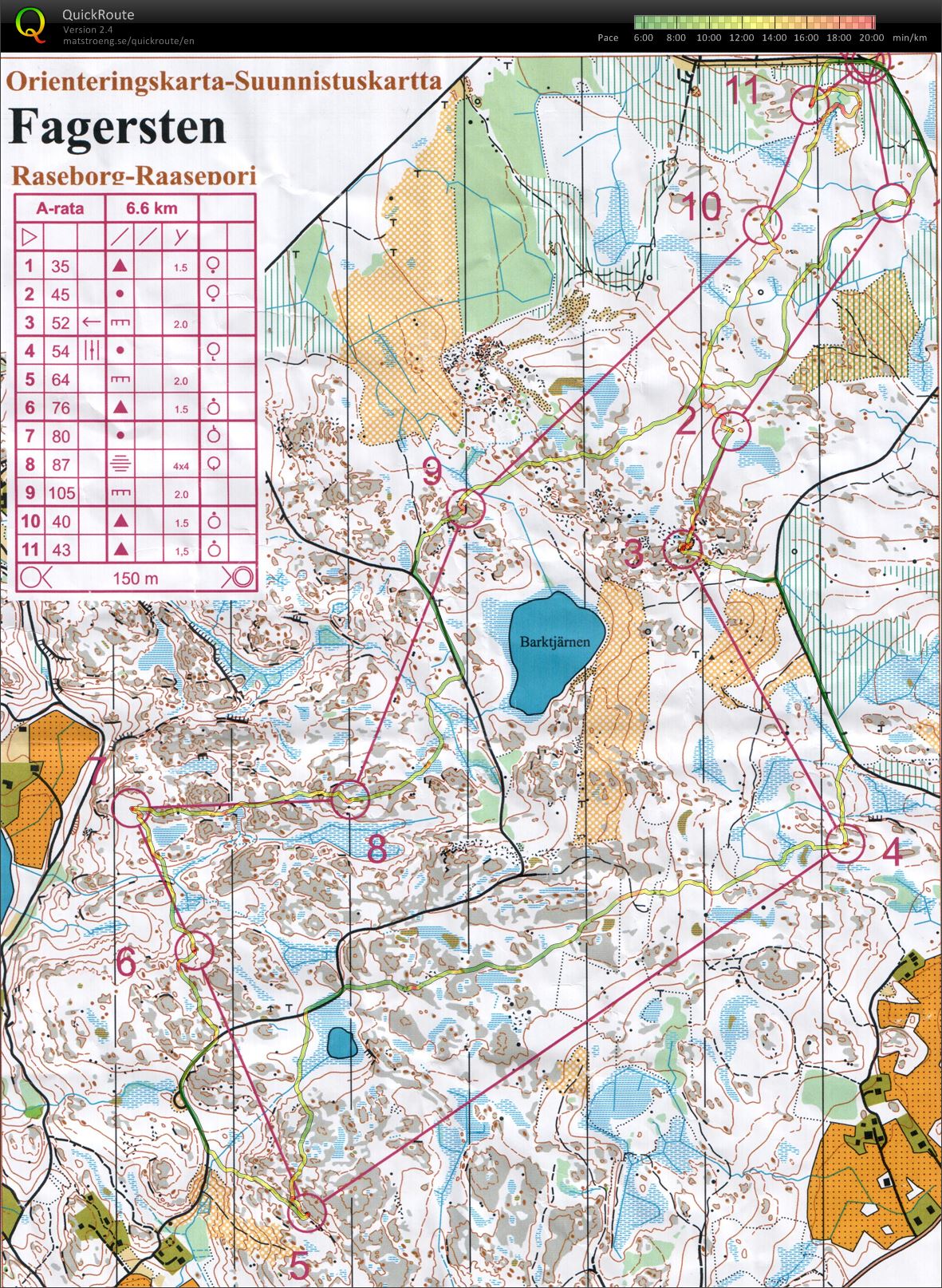
Karjaan Ura, monday-orienteering, Fagersten.
Without much training and without any time goal I participated in the Jakob half-marathon.
Up to 10 km things went smoothly. Then the steady uphill towards 11 km felt quite tough, although I sort of kept up the pace until about 14 km. From there it was a fight with a bit of walking now and then... The steady slow-down towards the finish shows in my 5k splits: 26:23, 27:25, 28:51, and 30:16. For comparison in 2012 on this course my 5k splits were: 23:47, 24:17, 24:20, and 24:09 - very steady and not slowing towards the end.
Here's a chart with the min/km times from the half-marathons I've run.
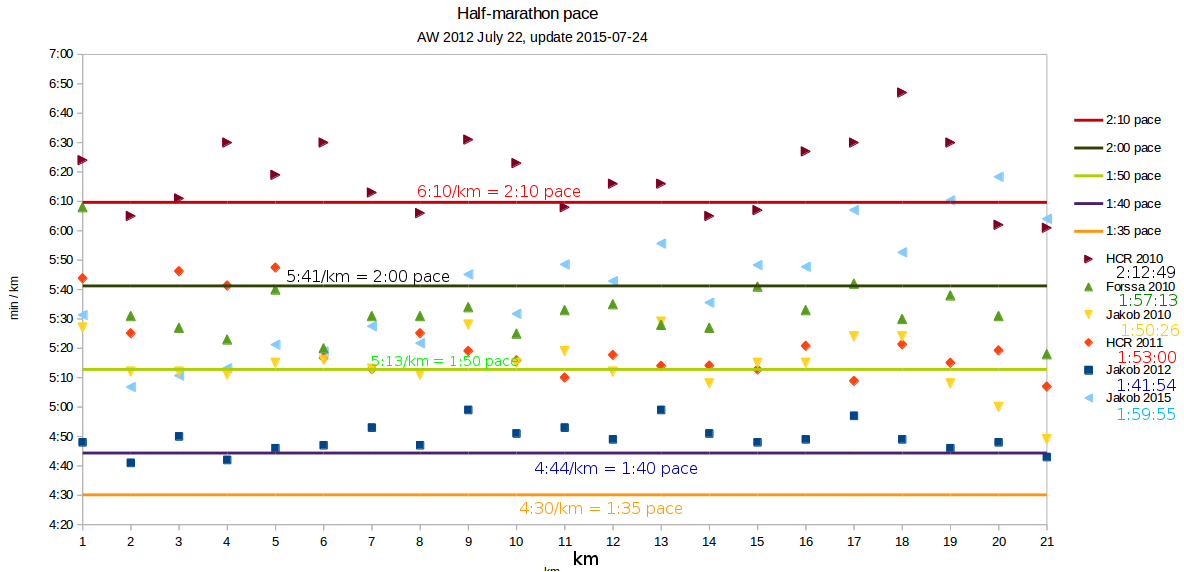
Next year I must remember to do one or two 90-120 minute training runs per month and things will go much smoother...
First 100+ k ride this year! A bit of rain in the middle and a steady headwind as usual 🙂

I'm in Torino for the School on Optical Clocks, and some work at INRIM.
Piazza vittorio veneto to the left, the river Po in the middle, and the bridge vittorio Emanuele I to the right.

Olympic Arch
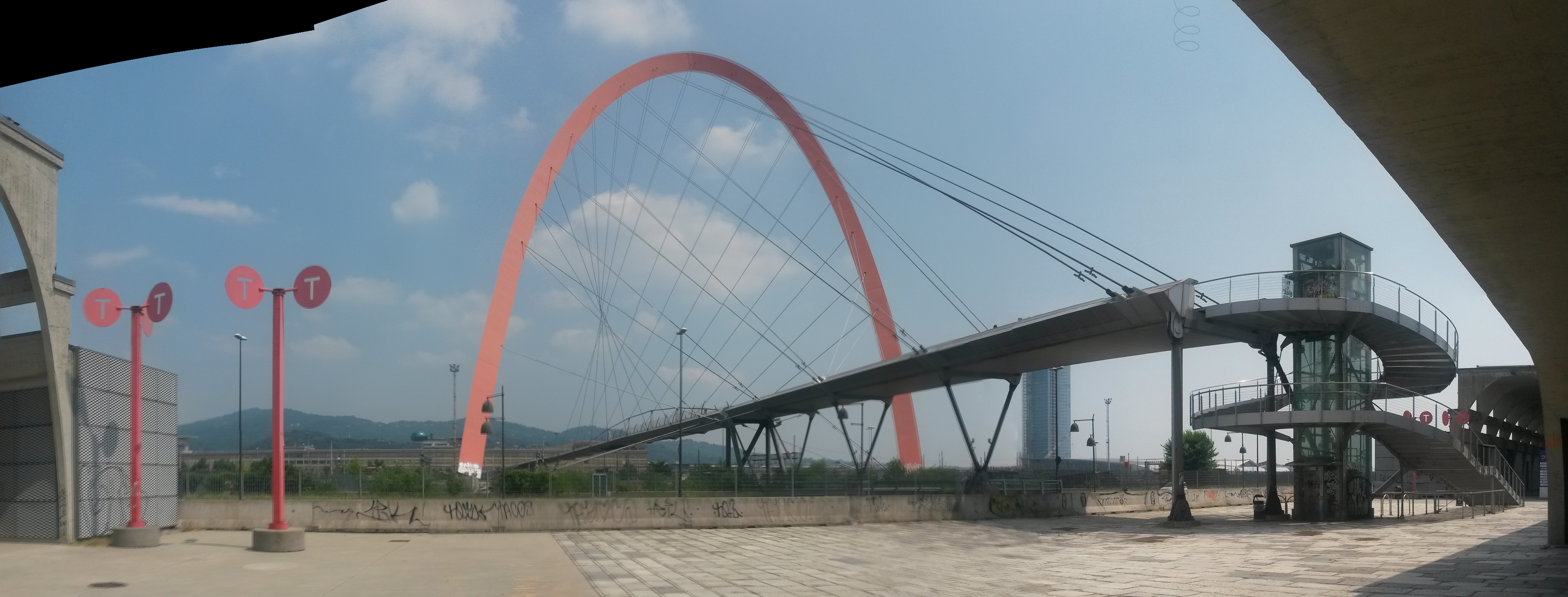
Samsung galaxy S4 mini phone + hugin panorama creator.
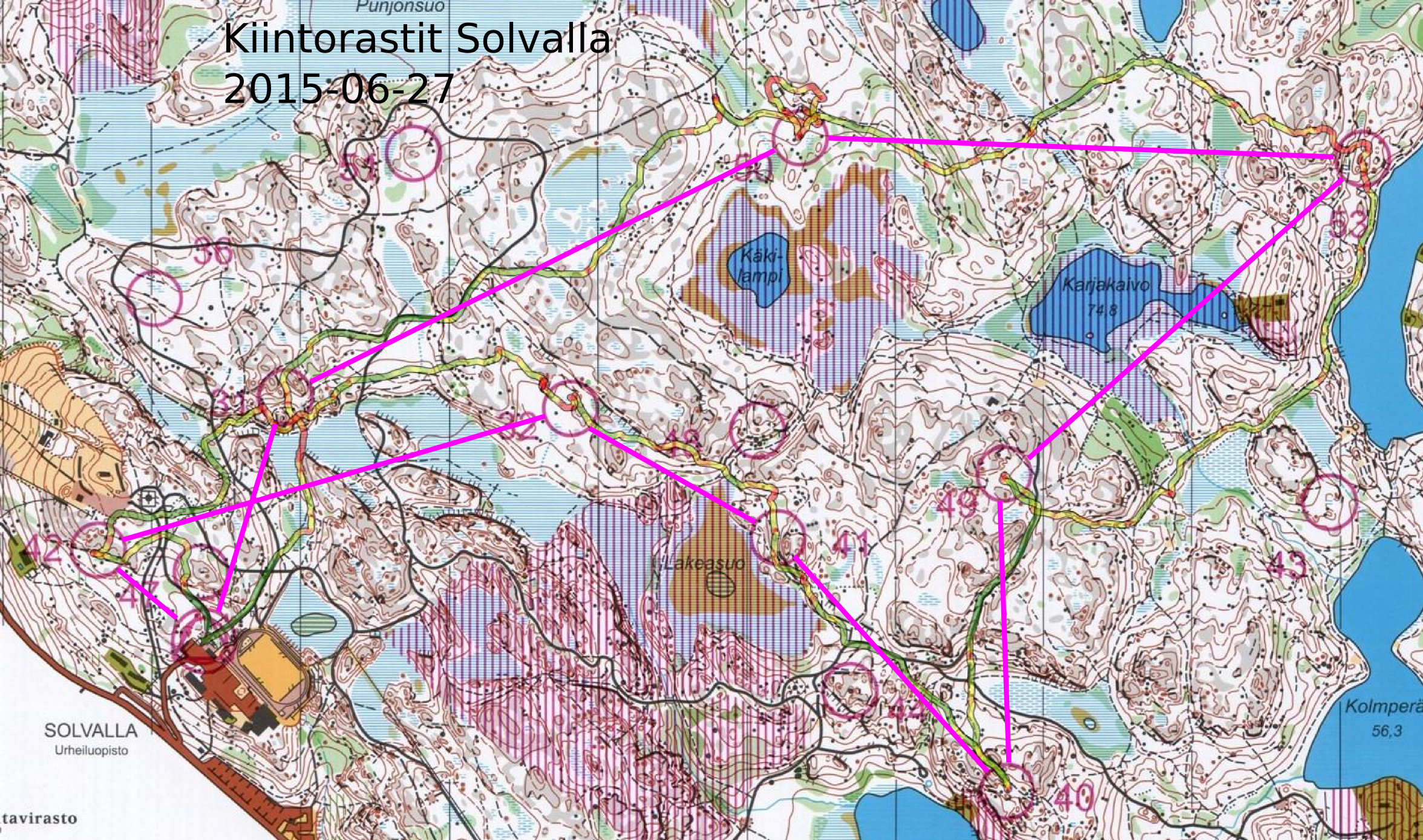
Another run on the Solvalla map with fixed controls. Last one was in April.
Problems on the second control (#50) where at first I didn't know exactly where on the dashed path I had come down from the hill, and then inside the control circle I looked for stones north up the hill when the control-stone was lower down in the forest.
Some (incomplete) notes on setting up a stratum-1 NTP server on Ubuntu 14.04LTS
To handle the upcoming leap-second we want a leapfile, from: http://www.ietf.org/timezones/data/leap-seconds.list
The path of the leapfile goes into /etc/ntp.conf
leapfile /etc/leap-seconds.list
But Ubuntu uses apparmor, so we must grant permission for the ntp service to read this file in /etc/apparmor.d/usr.sbin.ntpd by adding:
/etc/leap-seconds.list r,
To make apparmor parse and apply the new rules we do:
sudo apparmor_parser -r /etc/apparmor.d/usr.sbin.ntpd
when the ntp service starts it is useful to look at /var/log/syslog where ntp will complain if it doesn't have permission to read the leapfile or if it is badly formatted.
Now let's edit the default options for the ntp service in /etc/default/ntp by adding:
NTPD_OPTS='-gN'
(-N runs ntpd at highest priority, -g makes it more robust agaist large time offsets, see man ntpd)
To get time in NMEA-format and a pulse-per-second (PPS) from gpsd we add two shared-memory (type 28) refclock drivers to /etc/ntp.conf
# GPS Serial data reference

server 127.127.28.0 maxpoll 3

fudge 127.127.28.0 time1 -0.230 refid GPS
# GPS PPS reference
server 127.127.28.1 prefer maxpoll 2
fudge 127.127.28.1 refid PPS
(the time1 adjustment number needs to be calibrated somehow..).
Finally we let ntp distribute time to the outside world by adding this line to /etc/ntp.conf (this is usually at the end of the file).
restrict default noquery
Now let's set up gpsd. The service configuration file is /etc/default/gpsd, and as suggested in the file we edit it with the utility:
sudo dpkg-reconfigure gpsd
The options that worked for me are device /dev/ttyS0 and options -n (don't wait for clients to connect). After running the utility /etc/default/gpsd should look something like:
START_DEAMON="true"

GPSD_OPTIONS="-n"

DEVICES="/dev/ttyS0"

USBAUTO="false"

GPSD_SOCKET="/var/run/gpsd.sock"
You can verify that gpsd is working with cgps, xgps, or gpsmon.
This should result in Ubuntu automagically starting gpsd and ntpd in the correct order at bootup, and ntpq -p should show something along the lines of:

If you want to manually restart (or just start or stop) the services, required e.g. after any changes are made to /etc/ntp.conf, it is done with
sudo service ntp restart

sudo service gpsd restart
This is a follow-up to my earlier notes on the 53230A noise floor.
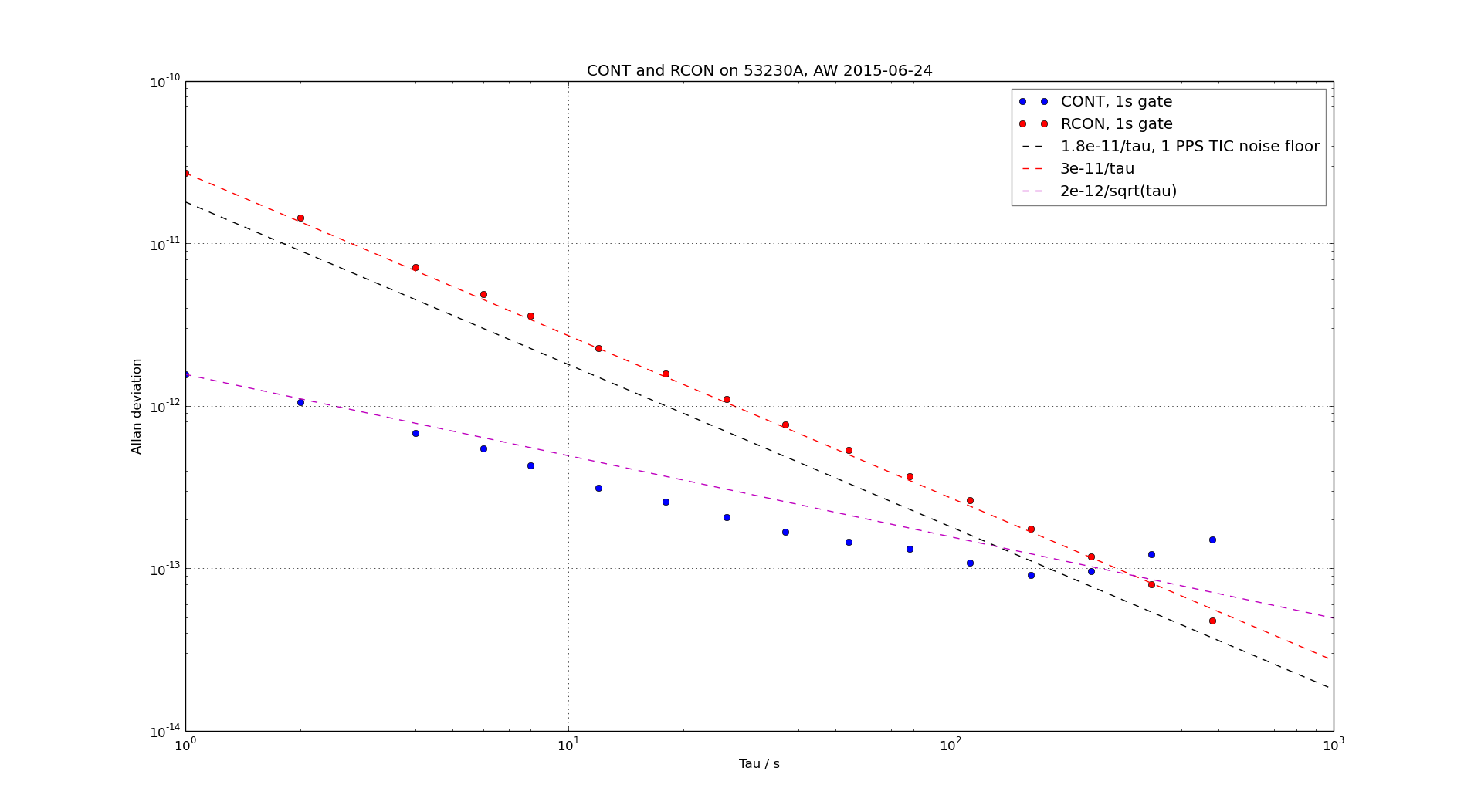
Naively I did the initial frequency-counting tests using READ?, which is wrong both because it produces data with dead-time and because the consensus for what is meant by Allan deviation assumes pi-counting.
Driven by marketing, no doubt, the 53230A employs internal averaging (something akin to lambda-counting) both with the simple READ? command and the continuous CONT mode mentioned in the manual. Amazingly you have to use the undocumented RCON mode to get pi-counting which will produce correct Allan deviations.
Here is a plot. The opportunity for making errors (with pi- vs. lamda-counting, and gap-free data) is less in time-interval mode, and I have indicated the 12 ps RMS noise floor (1.8e-11/tau in terms of Allan deviation) with a black dashed line. In RCON mode the noise floor has the same 1/tau dependence and I get about 3e-11/tau. If however you simply use the built-in settings of the counter with READ? or CONT you get a noise floor of about 2e-12/sqrt(tau) due to the internal averaging going on behind the scenes.
For a paper that explains pi- and lambda-counting see Dawkins2007 (fulltext PDF on ReaserchGate). Enrico Rubiola also has notes on counters.
Datafiles and script for ADEV and figure: 2015-06-18_rcon_cont.zip