Posts Tagged ‘Blog’

Aggregating and Filtering Feeds

Tuesday, December 25th, 2007

I’m trying to keep up with the ever increasing volume of scientific publications in my own and related fields. I’ve been using the Biophysical Journal’s email based service for some time, but lately it has been very unreliable - often alerting me about supposedly ‘new’ papers that have been published in 1994 or so. Another way is to subscribe to the RSS/Atom feeds many journals provide, and I’ve been doing that also with Google reader, but it easily means wading through 100s of papers per week.

It’s clear I need a better solution, something that first aggregates all the new papers into one big feed from the journals I am interested in, and then in a second step filters the big feed down to the few new papers that contain interesting keywords. Yahoo pipes could do that, but the LabVIEW-ish editor doesn’t scale very well to a situation where you have 20+ feeds and 20+ keywords you are looking for. There’s also google-mashup, but it isn’t open for the public yet.

A complex solution would be to set up my own Planet, but it doesn’t have web-based setup and administration so requires tinkering with config files etc. which I want to avoid.

So far I’ve only come up with this Thunderbird-based solution:

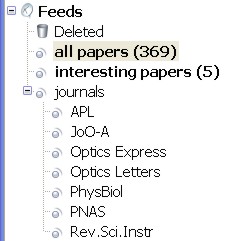
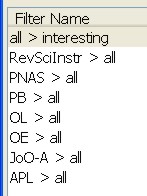
On the left I’ve subscribed to a number of journal feeds and put them in a folder of their own. On the right is a list of filters I am running. Each journal feed needs its own ‘dummy filter’ which does nothing but moves all the entries into the ‘all papers’ folder. Then I can run a filter of my own that looks for things in the subject or body of the paper. It’s simple, ugly, but seems to work somehow.

Please tell me there is a simpler way to do this in Thunderbird! Or is there already a good web-based service like this around?

My requirements would be:

  • able to read and aggregate: RSS/Atom etc. (whatever the journals provide)
  • set up filters that look for keywords in any field or in only one field (title, author, abstract etc.)
  • output an RSS feed with all papers, and the filtered papers that I can read with Thunderbird or Google-reader.

So far I haven’t found anything that would do this in a pain-free way. The aggregation part is handled by most web-based services, but there aren’t many that allow searching/filtering and can provide the results as a separate feed.

Something like this is already going on with ‘virtual-journals’ that aggregate papers across journals in one field (e.g. Virtual Journal of Biological Physics Research or Virtual Journal of Nanoscale Science & Technology). Papers get selected to these ‘VJs’ by their editors, but I’m thinking my aggregator+filter idea will be able to cover a broader range of journals and look for more specific search terms.

wp-cache

Friday, October 26th, 2007

To make the site a bit faster I’ve downloaded and installed wp-cache. It’s supposed to cache frequently accessed pages (like the front page) and potentially speed up the site a lot. Hope it works, you can comment below if you think the site is slower or faster than before.

This seems like something so central to wordpress that it should come with the default install?

WordPress 2.3 etc.

Tuesday, September 25th, 2007

There’s a new version of WordPress available, so I’ve upgraded. Unlike brand new buggy closed-source commercial software, I’ve found no problems with 2.3 “Dexter”.

I’ve been browsing through a lot of scientific papers lately, and was struck by just how bad Nature’s doi resolving sometime is. Try this for example: http://dx.doi.org/10.1038/nature04268
You get to a page with the article title, the authors, and the reference. But no sign of a link to the abstract, the HTML article, or the pdf article!?

I’ve also found a discussion on various pdf/paper archiving services. I’d like something that integrates well with EndNote, any ideas?

WordPress 2.2 with Widgets

Monday, May 28th, 2007

I’ve upgraded to the latest WordPress, which now includes drag and drop customization of the sidebar using widgets. A nice new addition to the default install is the ‘Recent Comments’ widget.

I had to switch to the new default theme that comes with 2.2, but after the usual mods the look of the site is back to normal.

I’m also experimenting with MiniPosts to create a side-blog, or Asides, for short comments/links.

In the future I’d like to include a tag-cloud and maybe some stats-listing in the sidebar.

WordPress 2.1

Monday, January 29th, 2007

I’ve upgraded to the latest WordPress, release 2.1

Hopefully everything works as before.

Funnily, the biggest new thing (besides ‘boring’ security fixes) advertized with 2.1 is a new visual editor for posts. But to my surprise I found it was not enabled by default! In the admin panel you need to go Users/Your Profile and check the “Use the visual editor when writing” tickbox to get the new and improved editor.

There’s also a new spell-checker, but for me it errors out with a cryptic message Could not execute AJAX call, server didn’t return valid a XML.”

For some reason I also needed to replace my <code>.htaccess</code> file for everything to work.

Update: I’m still finding it quite annoying that WordPress creates posts with no ALT tag when I insert images and don’t bother to include some text in the ALT field. This results in errors when doing XHTML validation. So I’ve filed a WordPress bug report. Let’s see what happens!

Tweaking the header

Saturday, January 20th, 2007

Some notes, mostly for myself, about how I chaged the header image and the way the title is displayed. I bet this will be usefull after the next WordPress update when the theme most likely gets reset back to default.

To get a header image that ‘rotates’ i.e. is updated with a new random picture each time the page is loaded, I used Matt Mullenweg’s simple rotate script. I named it rotate.php and placed it in wp-content/header-images/

I then placed the images I want as headers into wp-content/header-images/ and modified the CSS stylesheet for my theme:

#header {

background: #73a0c5 url('http://www.anderswallin.net/wp-content/header-images/rotate.php') no-repeat  center;

}

Note that some browsers (Firefox!) are smart enough to cache the header image, so if you want to see a new header pic simply pressing the ‘reload’ button won’t do - you need to do a full reload of the page by pressing Ctrl-F5. This is not necessary using Internet Explorer

Also, from the default layout of 4em size and centered alignment, my blog title is now a bit smaller and positioned in the top left corner (so as not to obstruct the nice header pic!):

h1 {

font-size: 3em;

position: absolute;

text-align: left;

bottom: 150px;

text-indent: 0.8em

}

Update: I’ve made a Photo page with all the banner images and short descriptions.