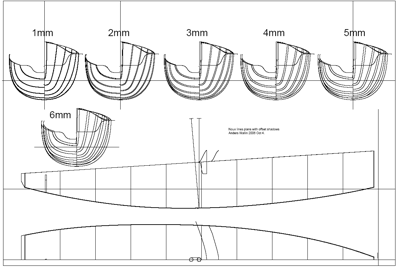
I've had a couple of requests for reduced shadows for the Noux by people wanting to home-build the boat using planking or other methods. Here are the lines with 1-6mm offset from the outer hull surface. A DXF file is attached to the pdf, click the small paper-clip next to the text to save the DXF as a separate file
Anders,
thanks for this, I will keep you informed on the Noux I will (try to) build this winter......
regards,
Eric
I recently downloaded freeship, hull design program.
I hope you don't mind but I had a go at inporting your drawing into the program.
I posted a small photo of the output of freeship today on the IOM forum at
http://www.iomclass.org/phpBB2/viewtopic.php?t=1074
As I said I hope this is ok, if not I'll remove it.
Cheers
Mike
I'm building a Noux 2 as a school project and I just wanted to know how far apart the planking frames should be? (3mm offset)
Hi Simon,
If we start at the bow, at the front of the bumper and call that 0 mm.
The first frame is at 12mm
second at 100mm
3rd at 200mm
and so on
10th at 900mm
11th at 1000mm
Anders
Hi Anders
Any chance of a drawing of the deck in pdf or dfx
Hi Andy,
the new style deck (rounded foredeck and cockpit aft-deck) is really more suitable for glassfiber moulding, it wouldn't be easy to build the decks to the design shape using plywood or planking etc.
The deck is included in this pdf / IGES
http://www.anderswallin.net/2006/03/noux-2-layout-plan-and-3d-iges-file/
let me know if you wanted some other kind of drawing of the deck.
Anders
Anders
Would it be possible to have a DXF file for the reduced shadows drawing,
I am looking to build the Noux as a first wooden IOM.
David
Anders,
great informative site - thanks. I would like to have a go at building one of these but I can't get the dxf file within the pdf to save anywhere. Can you please email it to me or post it on your site.
Thanks
Brett
Brett: I tried it with Adobe Acrobat Reader 8: open the pdf, right click on the paper-clip and select 'save embedded file to disk'. It works.
I am also using AA Reader 8.1.2 with Vista but the save option is not available, only open or search. Right clicking doesn't give any file handling options at all. I have managed to get it saved using Acrobat Standard on a work PC. Thanks for the followup.